
Contest
IOI 2026 Grading Equipment
Below you’ll find the hardware and software setup planned for IOI 2026.
Details may change as the event approaches.
Hardware
Each contestant will receive a workstation with the components listed below.
| CPU | Intel Core Ultra 5 225U |
| Graphics | Intel Arc |
| RAM | 16GB DDR5 |
| Storage | 512GB PCIe NVMe SSD |
| Display | 16" WUXGA IPS (1920 x 1200), |
| Keyboard | HP 225 wired keyboard, ISO format |
| USB Ports | 2 x USB Type-A | 2 x USB Type-C |
| Mouse | Hp 225 wired mouse |
CPU
Intel Core Ultra 5 225U
Graphics
Intel Arc
RAM
16GB DDR5
Storage
512GB PCIe NVMe SSD
Display
16" WUXGA IPS (1920 x 1200),
Keyboard
HP 225 wired keyboard, ISO format
USB Ports
2 x USB Type-A | 2 x USB Type-C
Mouse
Hp 225 wired mouse

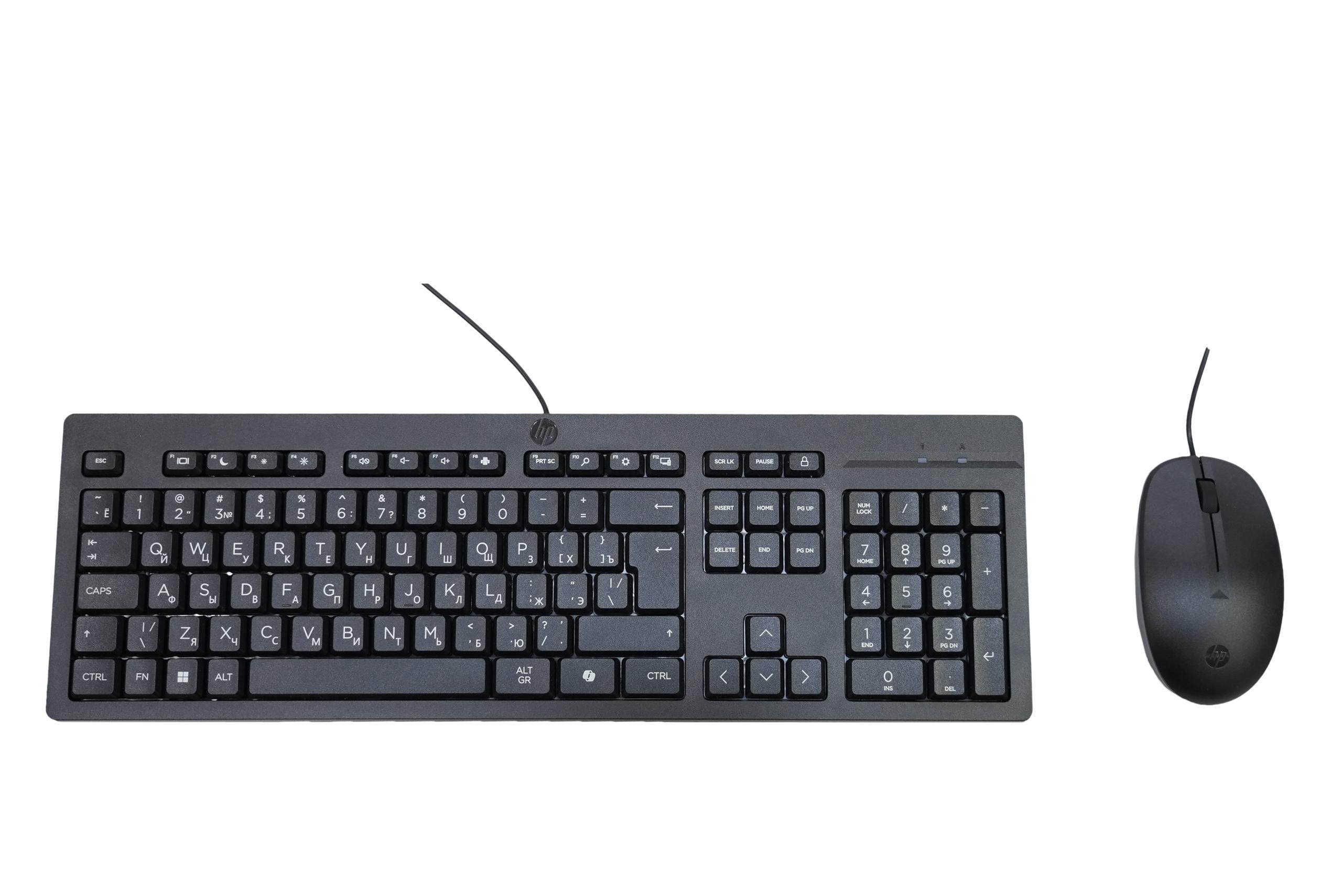
You may bring your own keyboard and mouse, provided they do not use wireless connectivity and do not retain programmable settings when unplugged (see Contest Rules ).
Software Stack
The following minimum versions will be installed on every machine. A pre-release virtual machine will be available for practice.
Software Versions — Ubuntu 24.04 LTS
| Category | Tool / Resource | Version / Notes |
|---|---|---|
| Operating System | Ubuntu | 24.04 LTS |
| Compiler / Runtime | GCC | 13.3.0 |
| Python 3.12 | 3.12.3 | |
| Text Editors / IDEs | Atom | 1.60.0 |
| Eclipse | 2026-06 | |
| Geany | 2.0 | |
| Emacs | 29.3 | |
| Joe | 4.6 | |
| Kate | 23.08.5 | |
| KDevelop | 5.12.230805 | |
| Nano | 7.2 | |
| Neovim | 0.12.3 | |
| Sublime Text | Build 4200 | |
| Vim | 9.1 | |
| Visual Studio Code | 1.124.2 | |
| C++ Extension (VS Code) | 1.32.2 | |
| Debuggers | DDD | 3.3.12 |
| GDB | 15.1 | |
| Valgrind | 3.22.0 | |
| Interpreters | Ruby | 3.2.3 |
| Documentation | C/C++ Reference | Offline HTML |
| Python 3 | Offline HTML | |
| Other Apps | Byobu | 6.11 |
| Firefox | 151.0.4 | |
| GNOME Terminal | 3.52.0 | |
| Konsole | 23.08.5 |
Operating System
- Ubuntu24.04 LTS
Compiler / Runtime
- GCC13.3.0
- Python 3.123.12.3
Text Editors / IDEs
- Atom1.60.0
- Eclipse2026-06
- Geany2.0
- Emacs29.3
- Joe4.6
- Kate23.08.5
- KDevelop5.12.230805
- Nano7.2
- Neovim0.12.3
- Sublime TextBuild 4200
- Vim9.1
- Visual Studio Code1.124.2
- C++ Extension (VS Code)1.32.2
Debuggers
- DDD3.3.12
- GDB15.1
- Valgrind3.22.0
Interpreters
- Ruby3.2.3
Documentation
- C/C++ ReferenceOffline HTML
- Python 3Offline HTML
Other Apps
- Byobu6.11
- Firefox151.0.4
- GNOME Terminal3.52.0
- Konsole23.08.5
Virtual Machine
To help contestants familiarize themselves with the software environment in advance, an IOI 2026 virtual machine image will be provided. The VM is intended solely for practice purposes — the actual contest computers will run the operating system natively, not inside a virtual machine. Therefore, please avoid reporting issues that are caused by virtualization-specific behavior or performance limitations of the VM.
- Releases: https://github.com/ioi-2026/contestant-vm/releases
- Issues: https://github.com/ioi-2026/contestant-vm/issues
- Virtualization tools: VMware Workstation Player 16/17, or VirtualBox
- Link to download
.ovafile Google Drive
Setting Up the VM
- Download
.ovafile from the latest release of GitHub repository or using the link provided above - Launch VMware Workstation Player and choose Open a Virtual Machine.
- Browse to the
.ovafile, select Open, then confirm by choosing Import (you can also simply drag and drop the file into VMWare). - If needed, give the VM a new name or pick a different storage location.
- Once the import finishes, select the VM and click Play Virtual Machine to boot it.
- Log in into the user using
ioias the password